
TIFF to JPG converter free no watermark
Convert TIFF to JPG online in seconds — no watermark, no signup, no software needed.
Looking for a fast, free, and reliable way to convert TIFF to JPG online? Our free TIFF to JPG converter lets you transform .tiff and .tif image files into high-quality JPEG images instantly — with no watermark, no file limits, and no registration required.
Simply upload your TIFF files, let our tool do the work, and download your converted JPGs in seconds. It’s that easy.
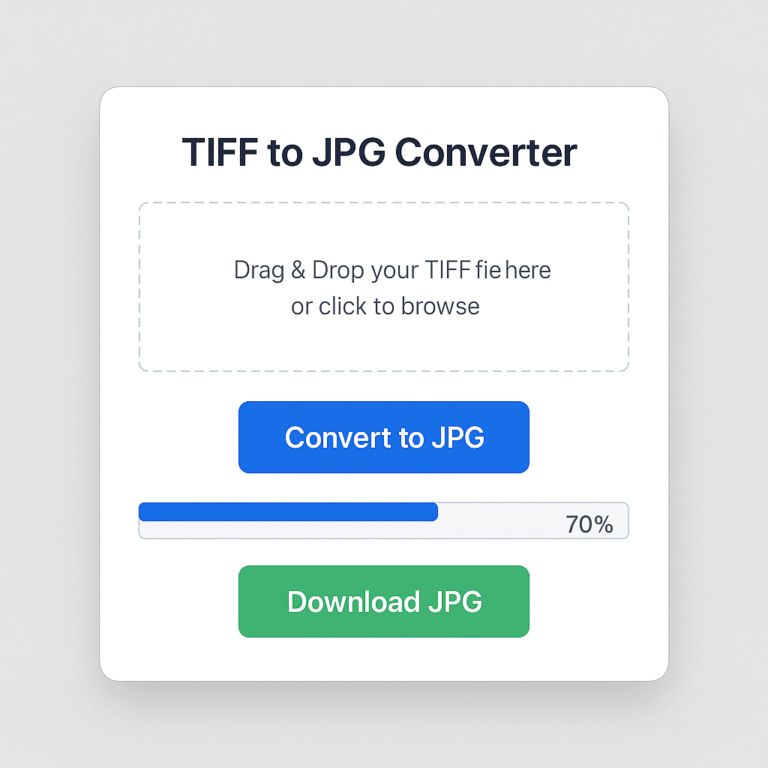
How to Convert TIFF to JPG Online — 3 Simple Steps
Converting TIFF files to JPG has never been easier. Follow these three simple steps:
- Upload Your TIFF Files — Drag and drop your .tiff or .tif files into the upload area, or click to browse from your device. You can upload up to 20 files at once (up to 200MB each).
- Convert Automatically — Our tool instantly processes your files in the browser. No waiting, no queue, no software to install.
- Download Your JPGs — Download converted JPG images one by one, or click “Download All” to get a ZIP archive with all your files.
The entire process takes just a few seconds. No account needed, no watermark added, and your files are automatically deleted after processing for your privacy.
Why Use Our Free TIFF to JPG Converter – No Watermark, No Limits?"
There are many TIFF to JPG tools online, but here’s why thousands of users choose PDFWiseTools:
- ✅ Completely Free — No hidden fees, no premium plans required. Convert as many files as you need at zero cost.
- ✅ No Watermark — Your converted JPG images are clean and ready to use. We never add watermarks or logos.
- ✅ No Signup Required — No email address, no account, no registration. Just upload and convert.
- ✅ Batch Conversion — Convert up to 20 TIFF files at the same time, saving you time and effort.
- ✅ High Image Quality — Our converter preserves visual quality while reducing file size to standard JPG format.
- ✅ Works on Any Device — Fully browser-based. Works on Windows, Mac, iPhone, Android, and any modern device.
- ✅ Supports .tif and .tiff formats — Whether your file ends in .tif or .tiff, our tool handles both.
- ✅ Secure & Private — We process only copies of your files. All uploaded files are permanently deleted within 60 minutes.
TIFF vs JPG: What's the Difference?
Understanding the difference between TIFF and JPG can help you decide when to convert.
TIFF (Tagged Image File Format) is a high-quality, lossless image format used by photographers, designers, and archivists. TIFF files preserve every detail of an image without compression, which makes them ideal for professional printing and document archiving. However, TIFF files are very large in size — sometimes 10x to 20x larger than a JPG — which makes them impractical for sharing online or uploading to websites.
JPG (JPEG) is the most widely used image format on the internet. JPG files use compression to reduce file size significantly while maintaining acceptable visual quality. They are perfect for sharing via email, uploading to websites, posting on social media, or storing on a device when space is limited.
When should you convert TIFF to JPG?
- When you need to share an image via email or messaging app
- When you want to upload a photo to a website or social media
- When your TIFF file is too large to send or store
- When a platform doesn’t support TIFF format
- When you need a smaller file size without needing perfect lossless quality
Is It Safe to Convert TIFF Files Online?
Yes — your files are completely safe with our TIFF to JPG converter. Here’s how we protect your privacy:
- We never store your original files. Our tool processes only a temporary copy of your uploaded file.
- All files are auto-deleted within 60 minutes after conversion is complete.
- No human ever sees your files. The entire conversion process is automated.
- We never share your data with third parties, advertisers, or any external service.
- Browser-based processing means your files never leave your device in some cases, adding an extra layer of security.
You can convert sensitive documents, scanned records, and personal photos with confidence.
Who Uses a TIFF to JPG Converter?
Our free converter is used daily by a wide range of users:
- Photographers who shoot in RAW/TIFF and need to share images online
- Office workers who receive scanned TIFF documents and need to convert them for email
- Designers and print professionals who need to reduce file sizes for web delivery
- Students who need to submit scanned assignments in JPG format
- Medical and legal professionals who work with scanned TIFF records
- Everyday users who just need to open or share a TIFF file they received
Frequently Asked Questions (FAQ)
Q: Is this TIFF to JPG converter really free?
Yes, 100% free. There are no hidden charges, no premium tiers, and no trial limitations. You can convert unlimited TIFF files to JPG at no cost.
Q: Does it add a watermark to converted images?
No. We never add watermarks, logos, or branding of any kind to your converted JPG images. What you download is exactly what you uploaded — just in JPG format.
Q: How many TIFF files can I convert at once?
You can upload and convert up to 20 TIFF files in a single batch. Each file can be up to 200MB in size.
Q: Will converting TIFF to JPG reduce image quality?
JPG uses lossy compression, which means some image data is removed during conversion. However, our tool optimizes the conversion to preserve as much visual quality as possible. For most everyday uses — sharing, emailing, uploading — the quality difference is barely noticeable.
Q: Do I need to create an account or sign up?
No. There is no registration, no email required, and no account needed. Simply visit the page and start converting immediately.
Q: What devices does this tool work on?
Our TIFF to JPG converter is fully browser-based and works on all modern devices including Windows PCs, Mac computers, iPhones, iPads, and Android phones and tablets.
Q: How long does it take to convert a TIFF file to JPG?
Most conversions are completed within a few seconds. Larger files or batch uploads may take slightly longer, but the process is generally very fast.
Q: Is my file deleted after conversion?
Yes. All uploaded files are automatically and permanently deleted from our servers within 60 minutes of processing. We never store, share, or access your files after conversion.
Q: Can I convert multipage TIFF files to JPG?
Yes. Our tool supports multipage TIFF files. Each page of a multipage TIFF will be converted into a separate JPG image, which you can download individually or as a ZIP archive.
Q: What is the difference between .tif and .tiff files?
Both .tif and .tiff are file extensions for the same TIFF image format. They are identical in function — the difference is just the number of characters in the extension. Our converter supports both formats.
Explore More Free Conversion Tools
Need to convert other file formats? Try our other free tools:
- PDF to TIFF – Convert PDF documents into high-quality TIFF images in seconds.
- TIFF to PDF – Convert TIFF images into a clean, shareable PDF file.
- JPG to TIFF – Turn JPG images into high-resolution TIFF files.
- PNG to TIFF – Convert PNG images to TIFF while preserving quality.
- TIFF to PNG – Convert TIFF files to PNG for web use and smaller file sizes.
All tools are free, browser-based, and require no signup.