

PDF to TIFF Converter — Free & Instant Online
PDF to TIFF converter that’s free, fast, and runs entirely in your browser. Convert PDF to TIFF online free with high-resolution multipage TIFF output at 150, 300, or 600 DPI. No installation, no signup, and no watermark on your output. This free PDF to TIFF converter no watermark tool handles batch processing of up to 20 files at once
- SSL Encrypted
- Auto-delete 60 min
- No Watermark
- All Devices
How to Convert PDF to TIFF Online Free
Converting PDF to TIFF online free takes three simple steps with our browser-based tool:
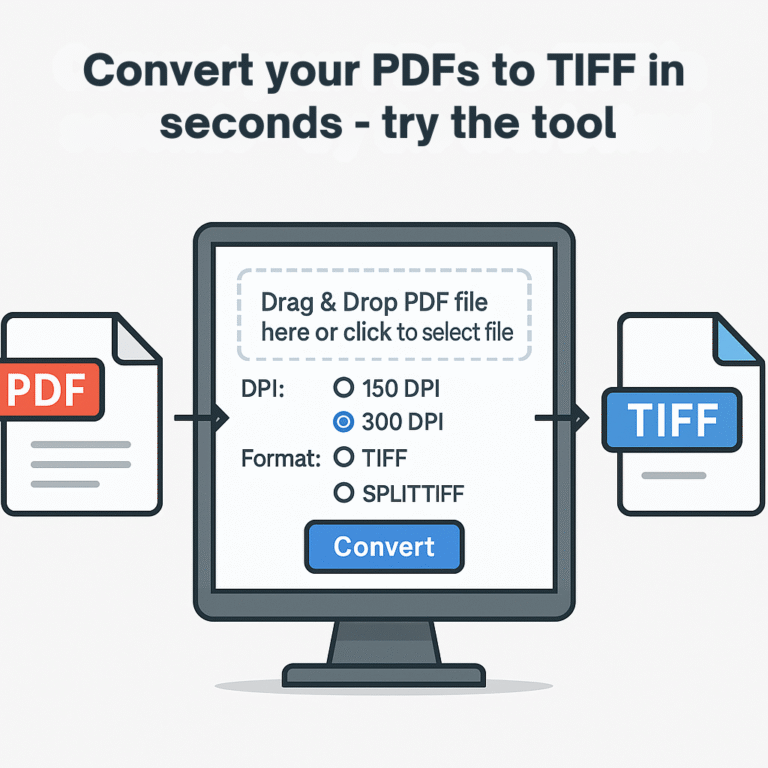
1. Upload Your PDF — Drag and drop your PDF file into the upload area or click to browse your device. You can batch-upload up to 20 PDF files at once, each up to 200 MB in size. Our PDF to TIFF converter accepts any standard PDF document.
2. Choose Your DPI — Select your preferred PDF to TIFF 300 DPI setting for standard print quality, 150 DPI for screen viewing, or 600 DPI for archival-grade output. Choose between a single PDF to multipage TIFF or individual TIFF images per page.
3. Download Your TIFF — Once conversion is complete, download each file individually or grab everything as a single ZIP archive. Your files are automatically deleted within 60 minutes for complete privacy.
The entire process takes under 10 seconds per file. No registration, no waiting queue, no limits on how many times you can convert PDF to TIFF online free.
Upload Your PDF
Drag and drop your PDF files or click to browse. Upload up to 20 PDFs at once, each up to 200 MB.
Choose DPI Settings
Select 150 DPI for screen, 300 DPI for print, or 600 DPI for archival. Choose multipage or single-page TIFF.
Download TIFF
Download each file individually or all at once as a ZIP. Files auto-delete within 60 minutes.
Why Convert PDF to TIFF?
People convert PDF to TIFF for three main reasons: professional printing, document archiving, and industry-specific filing requirements.
Professional printing demands lossless image quality at high resolution. TIFF supports uncompressed or losslessly compressed images at 300 DPI or higher, making it the format print shops, publishers, and graphic designers rely on when pixel-perfect output matters.
Document archiving is another common reason. Libraries, museums, law firms, and government agencies choose TIFF for long-term storage because it doesn’t degrade over time the way JPG does. The Library of Congress recommends TIFF as a preservation format.
Legal and medical filing systems frequently require TIFF format. Court eFiling systems, hospital EMR platforms, and insurance claim processors often expect documents in TIFF. Our PDF to TIFF converter produces the exact format these systems accept.
PDF vs TIFF: What's the Difference?
PDF (Portable Document Format) is designed for sharing. It preserves text, fonts, images, and layout so the document looks identical on any device. PDFs are typically vector-based — great for text-heavy documents but harder to edit at the pixel level.
TIFF (Tagged Image File Format) stores each page as a raster image — a grid of individual pixels. TIFF supports lossless compression, multiple pages in a single file, and high bit depths up to 48-bit color. It’s the standard for scanning, archiving, and professional image work.
When you convert PDF to TIFF, you’re creating a high-quality photograph of each page. The visual appearance is preserved perfectly, but text becomes part of the image. This trade-off is worth it when image quality matters more than text editability.
Key Features of Our PDF to TIFF Converter
Our PDF to TIFF converter is built for speed, quality, and privacy:
- Free forever — no hidden fees, no premium tier, no usage limits
- Multipage TIFF support — all PDF pages combine into a single TIFF
- DPI control — choose 150, 300, or 600 DPI for your specific needs
- Batch processing — convert up to 20 PDFs at once
- No watermark — your output is clean, nothing added
- No signup — start converting immediately, no account required
- Privacy-first — SSL encrypted uploads, auto-delete within 60 minutes
- Works everywhere — any browser on Windows, Mac, Linux, Android, iOS
Is It Safe to Convert PDF to TIFF Online?
Yes. Every file you upload travels over a TLS/SSL encrypted connection — the same encryption used by banks. Files are processed on isolated temporary storage and automatically deleted within 60 minutes. We don’t require an account, which means we never collect personal information tied to your uploads. We don’t read, analyze, share, or sell your documents.
For highly sensitive material — sealed court documents, medical records, classified business files — we recommend converting locally when possible. For everything else, our PDF to TIFF converter provides professional-grade security.
Who Uses Our PDF to TIFF Converter?
- Lawyers — converting case files to TIFF for court eFiling systems
- Architects — creating high-resolution TIFF from PDF blueprints
- Photographers — extracting print-ready images from PDF portfolios
- Medical professionals — converting documents for EMR systems
- Students & teachers — archiving academic documents in lossless format
- Government agencies — digitizing paper records for long-term preservation
- Publishers — preparing PDF artwork for high-quality TIFF output
Frequently Asked Questions About PDF to TIFF Conversion
What DPI should I use when converting PDF to TIFF?
Use 150 DPI for screen viewing and web use. Use PDF to TIFF 300 DPI for standard print work like brochures and reports. Use 600 DPI for archival-grade or fine-art printing. When in doubt, 300 DPI is the safe default that produces excellent results without bloating file size.
Can I convert a multipage PDF into a single TIFF file?
Yes. Our PDF to TIFF converter creates PDF to multipage TIFF output by default, combining all pages into one file. You can also choose to split them into individual TIFF images, one per page.
Is this PDF to TIFF converter really free?
Yes, completely free with no usage limits, no watermarks on output, and no account required. This is a free PDF to TIFF converter no watermark — there are no hidden premium features or paid upgrades
How long are my files stored after conversion?
All uploaded and converted files are automatically deleted within 60 minutes. We never keep copies or backups of your documents.
Does converting PDF to TIFF reduce image quality?
No. When you convert PDF to TIFF online free, TIFF uses lossless compression, so image quality is fully preserved. Higher DPI settings produce more detailed output with larger file sizes
Can I convert password-protected PDFs to TIFF?
You’ll need to remove the password protection first before uploading. Our PDF to TIFF converter processes unprotected PDF files only.
PDF to TIFF
Convert PDF documents into high-resolution multipage TIFF images for print, archive, or professional use.
TIFF to PDF
Combine single or multipage TIFF images into one clean, shareable PDF file. Quality stays intact.
JPG to TIFF
Convert JPG photos into lossless TIFF files for professional printing or long-term archival storage.
TIFF to JPG
Extract JPG images from TIFFs with adjustable quality. Perfect for web, email, or quick sharing.
PNG to TIFF
Turn PNG images into TIFF format while preserving transparency and embedded metadata.
TIFF to PNG
Convert TIFF files into web-ready PNG images with full transparency support and small file sizes.
School Age Calculator
Find out exactly which grade your child qualifies for based on USA school cutoff dates.
Slugging % Calculator
Calculate baseball slugging percentage in seconds. Fast, accurate, and free for every player.